Edit your video
Captions and on-screen labels
Many people watch with the sound low or off. Captions keep them following along; labels make the key words stick.
Caption styles
Open Captions, voice & character. Turn captions on or off, then pick a style:
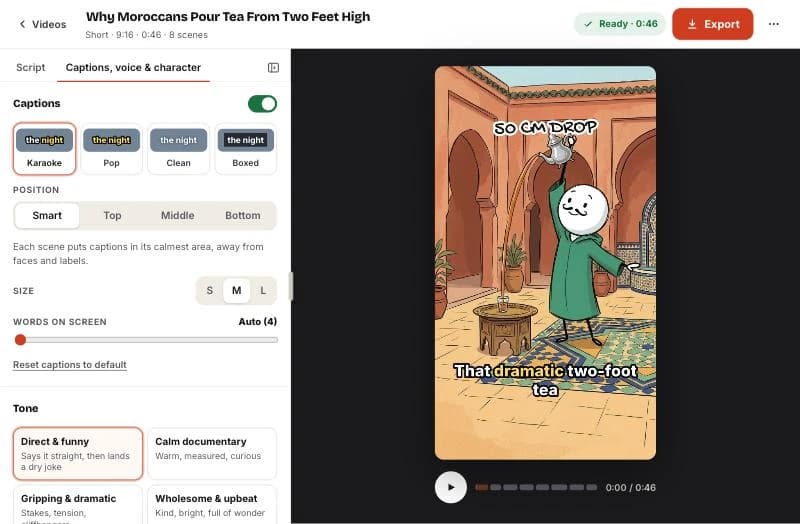
- Karaoke: the word being spoken lights up. The classic Shorts look.
- Pop: bold words that pop in, colored for vertical video.
- Clean: plain white text with a soft shadow.
- Boxed: text on a dark box, the most readable on busy pictures.
Where captions go
Smart (recommended) places captions in each scene’s calmest area, away from faces and labels, and keeps them steady between scenes. You can also force Top, Middle or Bottom.
Set the size (S, M, L) and how many words show at once. Auto shows about four words on vertical video.
Labels
Labels are hand-lettered words at the top of a scene: dates, names and key terms. The script writer adds a few automatically; add or edit them on any scene with Add label. One to three words reads best.
Related help
Updated October 22, 2026 · Still stuck? support@sticktale.com
Make your first stickman video
StickTale is in private beta. Join the waitlist and we’ll send your invite as soon as a spot opens.