Edit your video
Tone, voice and music
The same story can feel cheeky, calm or tense. Tone shapes the writing, the delivery and the music; the narrator sets the voice.

The four tones
Pick a tone in the composer before you create. It decides how the script is written, so it matters most at the start.
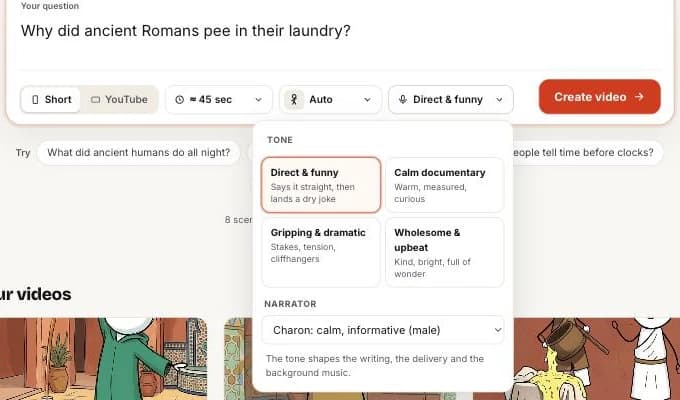
| Tone | Sounds like | Good for |
|---|---|---|
| Direct & funny (default) | Says it straight, then lands a dry joke every few scenes | Weird history, everyday science, Shorts |
| Calm documentary | Warm, measured, curious | Long-form, heavier topics, classrooms |
| Gripping & dramatic | Stakes, tension, cliffhangers | Disasters, mysteries, battles |
| Wholesome & upbeat | Kind, bright, full of wonder | Nature, inventions, kids’ curiosity topics shown by teachers |
Choose a narrator
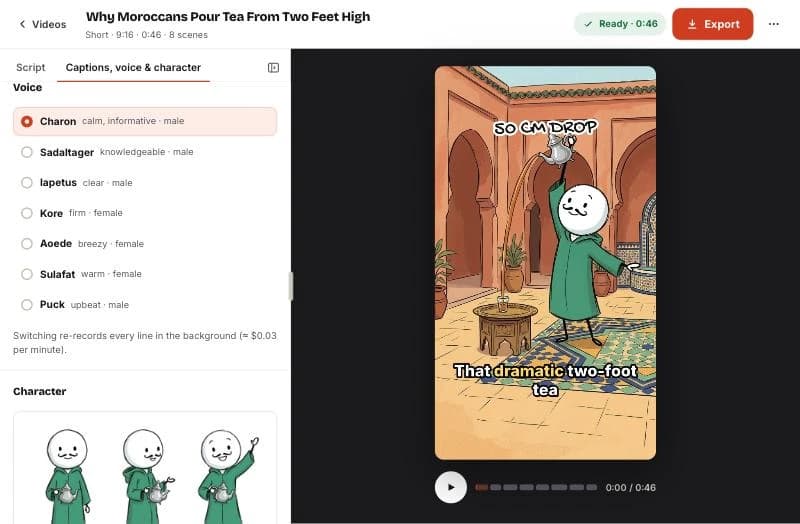
Seven narrator voices are available, male and female. Choose one in the composer, or later in Captions, voice & character. Switching re-records every line in the background.
Music and sound effects
Background music matched to the tone plays under the narration and dips while someone is speaking. Light sound effects mark scene changes and labels. Turn either off under Sound in the settings.
Related help


Updated October 22, 2026 · Still stuck? support@sticktale.com
Make your first stickman video
StickTale is in private beta. Join the waitlist and we’ll send your invite as soon as a spot opens.