Publish
Export your video and upload it
Exporting happens in your browser, so nothing is uploaded to us. You get an MP4 and everything YouTube Studio asks for.
Download the MP4
Click Export at the top right of the Studio.
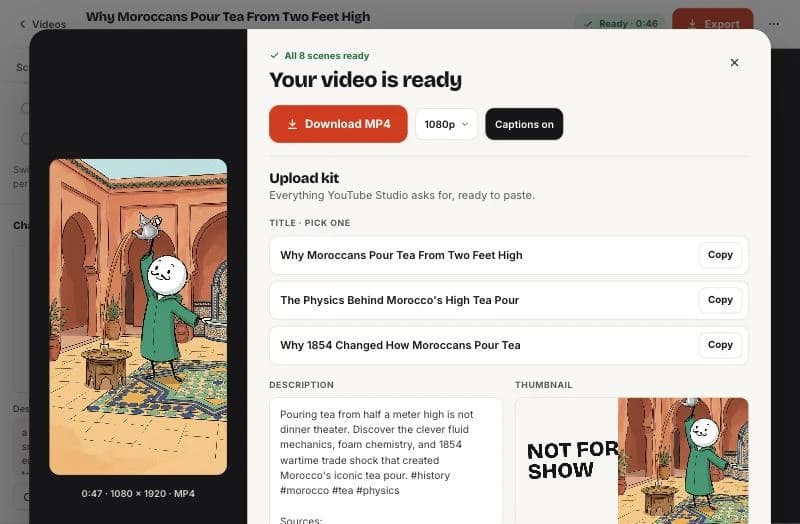
- Choose 1080p (best) or 720p (faster).
- Leave Captions on, or turn them off if you will add your own.
- Click Download MP4. The video is assembled on your device in a few seconds and saved to your downloads.
Use the upload kit
Under the download button you get everything for the upload form:
- Three title options: pick the one that matches your hook. Click Copy.
- A description with the sources from the research, so viewers can check facts.
- A thumbnail with short text over your best scene. Download it as a PNG.
Before you publish
- Watch the whole video once with sound and once without.
- Check names, numbers and dates against the sources. See checking facts.
- On YouTube, answer the altered or synthetic content question honestly. YouTube says clearly unrealistic animation usually does not need a label; check its current rules.
- Add your own angle in the title, pinned comment or description. Channels that only repost generic content can lose monetization under YouTube’s policies.
Questions
Is there a watermark?
No. Exports are clean.
Can I post to TikTok and Reels?
Yes. The vertical MP4 works on YouTube Shorts, TikTok and Instagram Reels.
Related help

Updated October 22, 2026 · Still stuck? support@sticktale.com
Make your first stickman video
StickTale is in private beta. Join the waitlist and we’ll send your invite as soon as a spot opens.